Task Examples#
You can find helpful examples within the examples folder of the neurokraken repository
These examples are ready to run and showcase the range of neurokraken’s capabilities. By default they use mode='keyboard' in the Neurokraken initialization allowing them to run without connected electronics. As neurokraken is built for ease-of-use running neurokraken tasks with connected physical devices, only requires changing to mode='teensy', running config2teensy.py, and uploading the code it created in the teensy folder to your teensy.
For keyboard mode inputs contain an additional keys=[] list allowing you to map keyboard keys to inputs - this property is not needed outside of keyboard mode.
Some examples showing how to integrate external packages/utilities have additional requirements that are noted here and will have to be pip installed in order to run respective examples like VizDOOM and eye_tracking.
For examples showing how to integrate assets like images and 3D models, these assets can be found and are loaded from examples/assets
Note
Use Ctrl + Alt + Q to quit running tasks. In further developed tasks you might call get.quit() from a UI element (or closing of an UI window), but Ctrl + Alt + Q will always work, even for neurokraken tasks running in just the command line.
Introduction examples#
These examples are small introductory examples to get you started with Neurokraken
minimal#
This task just runs a minimal state loop forever until you end the run.
# setup configuration
from neurokraken import Neurokraken, State
from neurokraken.configurators import devices, Display, Camera, Microphone

serial_in = {}
serial_out = {}

nk = Neurokraken(serial_in=serial_in, serial_out=serial_out, log_dir='./', mode='keyboard')

# task design
from neurokraken.controls import get

class My_State(State):
    def loop_main(self):
        # add your experiment code here where it will run in a loop
        pass

task = My_State()

nk.load_task(task)

nk.run()
blink#
We will just show the color green on a display in this state and blink an LED every 5 seconds. This example is a good starting point to understand the basic structure of Neurokraken and then modify into your task of interest.
from neurokraken import Neurokraken, State
from neurokraken.configurators import Display, devices

serial_in = {
}
serial_out = {'led': devices.direct_on(pin=3, start_value=False)
}

nk = Neurokraken(serial_in=serial_in, serial_out=serial_out,
                 display=Display(size=(800, 600)), mode='keyboard')

#------------------------- CREATE A TASK AND RUN IT -------------------------

from neurokraken.controls import get

class Green(State):
    """We will just show the color green on a display in this state and blink an LED every 5 seconds"""
    def on_start(self):
        # store relevant variables within the state self
        self.t_last_switch = 0
        self.led_status = False

    def loop_main(self):
        if get.time_ms > self.t_last_switch + 5_000:
            self.led_status = not self.led_status
            get.send_out('led', self.led_status)
            self.t_last_switch = get.time_ms

    def loop_visual(self, sketch):
        sketch.background(0,255,0)

task = Green()

nk.load_task(task)

nk.run()
quickstart#
The example created in the quickstart chapter
# setup configuration
from neurokraken import Neurokraken, State
from neurokraken.configurators import devices, Display, Camera, Microphone

serial_in =  {'light_beam': devices.analog_read(pin=3, keys=['s', 'w'])}
serial_out = {'reward_valve': devices.timed_on(pin=2),
              'LED': devices.direct_on(pin=4)}

nk = Neurokraken(serial_in=serial_in, serial_out=serial_out, mode='keyboard')

# task design
from neurokraken.controls import get

class Poke_for_reward(State):
    def on_start(self):
        get.send_out('LED', True)

    def loop_main(self):
        if get.read_in('light_beam') < 400:
            get.send_out('reward_valve', 100)
            get.send_out('LED', False)
            get.progress_state('delay')

class Delay(State):
    pass

task = {
    'poke': Poke_for_reward(),
    'delay': Delay(next_state='poke', max_time_s=8)
}

nk.load_task(task)

nk.run()
display#
Another short introduction example
Here a a green rectangle is periodically appearing on the screen. Triggering a touch sensor during its appearance leads to a the delivery of a reward drink droplet from a valve.
from neurokraken import Neurokraken, State
from neurokraken.configurators import Display, devices

serial_in  = {'my_touch_sensor': devices.binary_read(pin=30, keys=['a'])}
serial_out = {'my_reward_valve': devices.timed_on(pin=31)}

nk = Neurokraken(serial_in, serial_out, display=Display(), mode='keyboard')

from neurokraken.controls import get

class Touch_When_Visible(State):
    def on_start(self):
        self.visible = False
        self.last_switch = get.time_ms

    def loop_main(self):
        if self.visible:
            if get.read_in('my_touch_sensor') == 1:
                # This sensor is currently touched, open a reward valve for 70ms, reset to not visible
                get.send_out('my_reward_valve', 70)
                self.visible=False
                self.last_switch = get.time_ms

        if get.time_ms > self.last_switch + 2000:
            # switch the visibility every 2000 milliseconds
            self.visible = not self.visible
            self.last_switch = get.time_ms

    def loop_visual(self, sketch):
        sketch.background(0,0,0)
        if self.visible:
            sketch.fill(0, 255, 0)
            sketch.rect(200, 200, 400, 300)

task = Touch_When_Visible()

nk.load_task(task)

nk.run()
steering#
A simple steering task with the goal of steering a displayed shape from the center to the more rewarding side. Once the edge has been reached a green or red delay state visual will be shown to reinforce the outcome.
This task utilizes a trial structure and will change the more rewarding side every 5 trials.
Steering task are common to investigate a wide range of decision and learning processes in rodents https://elifesciences.org/articles/63711 int-brain-lab/iblrig
from neurokraken import Neurokraken, State
from neurokraken.configurators import Display, devices

serial_in = {
    'steering_wheel': devices.rotary_encoder(pins=(31, 32), keys=['left', 'right'])
}

serial_out = {
    'reward_valve':   devices.timed_on(pin=40),
}

nk = Neurokraken(serial_in=serial_in, serial_out=serial_out,
                 display=Display(size=(800, 600)), mode='keyboard')

#----------------------------------- TASK -----------------------------------

from neurokraken.controls import get
import random

good_side = random.choice(['left', 'right'])
background_color = (0, 0, 0)
steering_scaling = 0.3

class Delay(State):
    def loop_visual(self, sketch):
        global background_color
        sketch.background(*background_color)

class Steer(State):
    def on_start(self):
        # get the encoder position at the start of the state.
        # All our movements will be calculated as relative to this starting position.
        self.last_position = get.read_in('steering_wheel')
        self.position = 400

    def loop_main(self):
        global steering_scaling, good_side, background_color
        new_position = get.read_in('steering_wheel')
        delta = new_position - self.last_position
        delta *= steering_scaling
        self.position += delta

        # update the current position for the next loop iteration
        self.last_position = new_position

        background_color = (64, 0, 0)
        if self.position > 700 or self.position < 100:
            # a decision has been steered, if correct provide a reward and override the color used by the delay
            if (self.position > 700 and good_side == 'right') or (self.position < 100 and good_side == 'left'):
                get.send_out('reward_valve', 50)
                background_color = (0, 64, 0)
            return True, 0
        else:
            return False, 0

    def loop_visual(self, sketch):
        sketch.background(0)
        sketch.fill(0, 127, 0)
        sketch.stroke(0, 255, 0)
        sketch.rect_mode(sketch.CENTER)
        sketch.rect(self.position, 300, 100, 300)

last_trial_side_changed = 0
def change_side():
    global last_trial_side_changed, good_side
    if len(get.log['trials']) > last_trial_side_changed + 5:
        good_side = 'left' if good_side == 'right' else 'right'
        print(f'Changed good side to {good_side}')
        last_trial_side_changed = len(get.log['trials'])

task = {
    'steer':   Steer(max_time_s=30, next_state='waiting'),
    'waiting': Delay(max_time_s=1, next_state='steer', trial_complete=True, run_at_end=change_side)
}

nk.load_task(task)

nk.run()
corridor_3d#
In this task the subject traverses a virtual world created in blender along a corridor track by moving a steering wheel, treading disk, hover ball or similar input. The path leads through a central tunnel segment and once the end of the path is reached the subject will be teleported back to the start. Stopping movement in the tunnel segment however will lead to a reward that can be collected once on the way to the end.
This task provides an example for:
running a typical corridor progression task
A go/no-go task
utilizing blender created assets as part of a 3d task environment
positioning 3D elements and the camera in space dependent on task parameters
Utilizing a 3D .obj with blender and py5#
If you are not familiar with blender, it is an outstanding open source project that allows modeling 3D objects, state of the art movies and more.
The BlenderGuru Donut tutorial on youtube is a great introduction to blender
use whichever resources work for you to learn building a 3d .obj .
You can lookup workflows for specific steps, i.e. adding color textures to your model on youtube, which is full of high quality short (5 minutes) quickstarts on blender topics like texture painting like this video.
.obj files you created from programs other than blender also work just the same.
as an example this taks uses the following world modeled out of a plane, some stretched boxes, cylinders, and applied self-drawn textures.
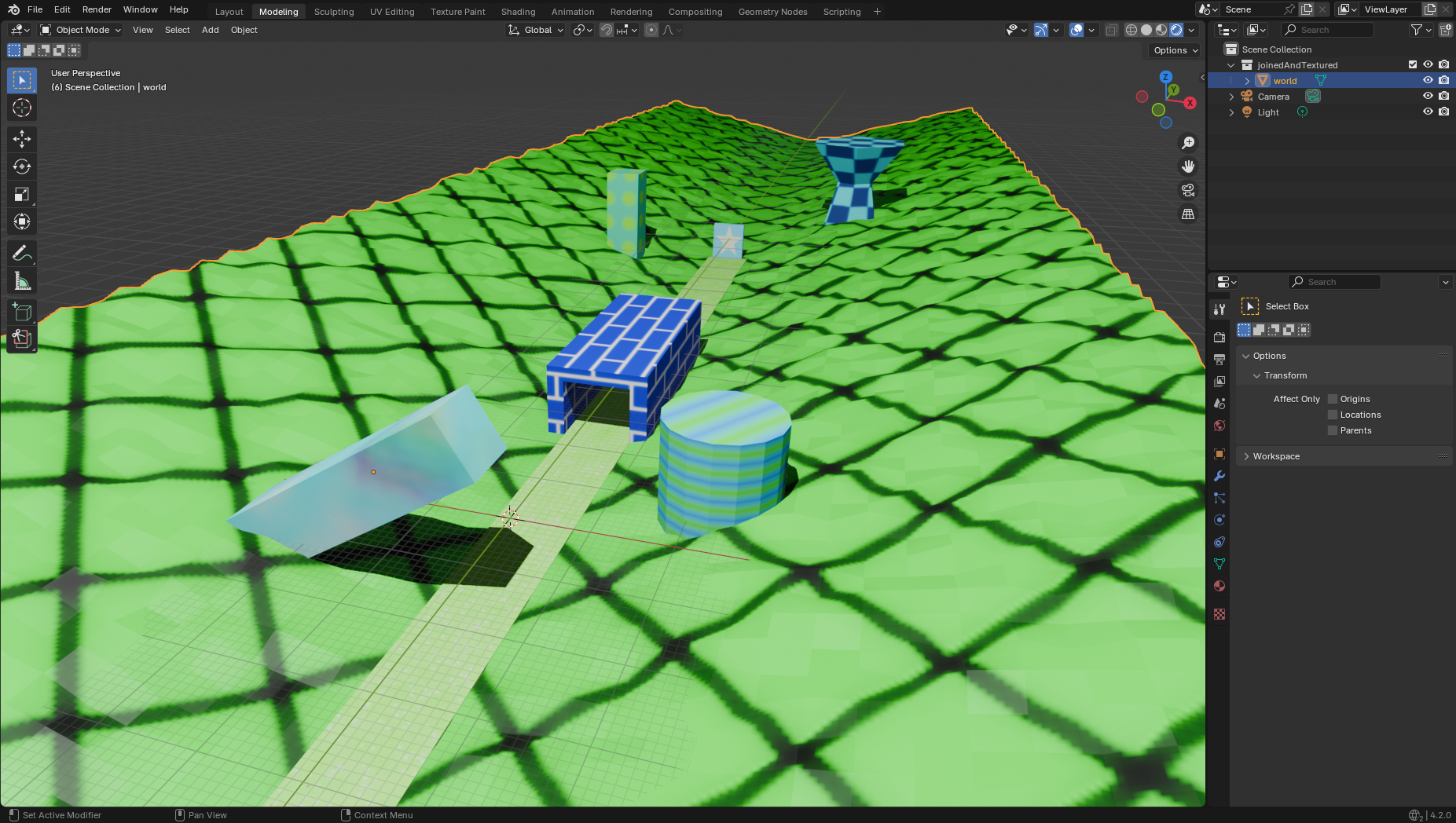
To export your object for usage select the object in Object mode, then:
File -> Export -> Wavefront (.obj)Set the export parameters:
Forward Axis = -Z,Up Axis = -Ywith checkmarked:Selection OnlyandMaterialsand importantlyMaterials->Path Modeset toCopyOn coordinate system/axis differences between frameworks
Py5/Processing differs from from Blender by using a left hand coordinate system where the Up axis is -Y and the forward axis is -Z.A defined y and z axis still leave open 2 possible directions for x to go into depending on whether one uses a right hand (blender) or left hand (py5/Processing) coordinate system. Thus the first the python code does after
world = sketch.loadShape('world.ob')isto flip the x axis back from the assumption of a same handed coordiante system to the right side withworld.scale(-1, 1, 1)Without this line your model would remain mirrored in x.After the export you should have a texture image file that you already created during your blender modeling, a newly exported .obj file of your object, and a .mtl file. All 3 files need to exist together to be able to load the colored object into another framework.
Your export is now ready for
sketch.loadShape('filename.ob')and usage in py5.
from neurokraken import Neurokraken, State
from neurokraken.configurators import Display, devices

serial_in = {
    'walking_pos': devices.rotary_encoder(pins=(31, 32), keys=['down', 'up'])
}

serial_out = {
    'reward_valve':   devices.timed_on(pin=40),
}

display = Display(size=(800,600), renderer='P3D')  # ! Important to set the renderer to P3D for 3D

nk = Neurokraken(serial_in=serial_in, serial_out=serial_out,
                 display=display, mode='keyboard')

from neurokraken.controls import get
from pathlib import Path
import numpy as np

class Corridor(State):
    def on_start(self):
        # get the encoder position at the start of the state. All our movements will be calculated as
        # relative to this starting position.
        self.steering_scale = 0.025
        self.last_position = get.read_in('walking_pos')
        self.position = 465

        self.recent_deltas = [0] * 50
        self.last_speed_check = get.time_ms
        self.received_reward = False

    def loop_main(self):
        new_position = get.read_in('walking_pos')
        delta = new_position - self.last_position
        # update the current position for the next loop iteration now that you have the delta
        self.last_position = new_position
        # scale the delta for the task
        delta *= self.steering_scale
        self.position += delta
        # prevent walking backwards out of the world
        self.position = max(465, self.position)

        if self.last_speed_check + 10 < get.time_ms:
            self.last_speed_check = get.time_ms
            self.recent_deltas.pop(0)
            self.recent_deltas.append(delta)

        if self.position > 545 and self.position < 585:
            if np.sum(np.abs(self.recent_deltas)) < 0.1 and not self.received_reward:
                get.send_out('reward_valve', 80)
                self.received_reward = True

        if self.position >= 660:
            # the end was reached, go on to the next trial
            get.progress_state('corridor')

    def loop_visual(self, sketch):
        sketch.background(0, 0, 40)

        # set the camera field of view (these methods are documented in the py5 documentation)
        sketch.perspective(1, sketch.width/sketch.height, 0.01, 1000)

        sketch.lights()
        # move to the current position (here the only change is in the z-axis)
        sketch.translate(sketch.width/2, sketch.height/2, self.position)
        # add light from the top back
        sketch.directional_light(126, 126, 126, 1, 1, 1)
        sketch.directional_light(126, 126, 126, -1, -1, 1)
        # show the world
        sketch.shape(self.world)

    def pre_task(self, sketch):
        # assets needs to be loaded before other functions that might need them
        filepath = str((Path(__file__).parent / 'assets' / 'corridor.obj').resolve())
        self.world = sketch.load_shape(filepath)
        # py5 uses a left hand coordinate system mirrored from blender's right hand system => flip the x axis
        self.world.scale(-1,1,1)

#------------------------- TASK PROTOCOL BLOCKS AND BLOCK TRIAL STATES -------------------------

task = {'corridor': Corridor()}

nk.load_task(task)

nk.run()
DOOM#
In this task the subject plays DOOM. That’s it. ViZDoom https://vizdoom.cs.put.edu.pl/ is a reinforcement learning environment primarily intended for research in machine visual learning and deep reinforcement learning.
This task provides an example for:
Using a continous reinforcement learning environment rich in states, actions and outcomes.
Using a python package (vizdoom) as part of your experiment.
Using serial_in entries with imported code - Here a joystick and a capacitive button
Displaying an image/numpy array (the screen_buffer) in loop_visual()
This is also useful for tasks purely displaying visual stimulus images or videos
VIZDOOOM has an extensive range of functionalities and this task only provides a starting example utilizing inputs to turn left/right, move forward/back, and fire/use.
VIZDOOM’s examples and reference can be found at the ViZDoom examples and the VizDoom reference .
The same approach shown in this task can be utilized to use the Neurokraken in combination with other popular reinforcement learning environments and gyms.
As the joystick device a PSP 2000 joystick is being used which can be connected and read as 2 devices.analog_read() for left/right and up/down.
To run this example you need to install ViZDoom into your environment with pip install vizdoom --pre
If your primary display is set to vertical/portrait ViZDoom may not be able to run. Changing to a horizontal/landscape display as your primary display fixes this issue.
from neurokraken import Neurokraken, State
from neurokraken.configurators import Display, devices

serial_in  = {'shoot': devices.binary_read(pin=13, keys=['space']),
              'turn': devices.analog_read(pin=14, keys=['left', 'right']),
              'forward': devices.analog_read(pin=15, keys=['down', 'up'])}

serial_out = {'reward': devices.timed_on(pin=40)}

nk = Neurokraken(serial_in, serial_out, display=Display(size=(800, 600)), mode='keyboard')

from neurokraken.controls import get
from neurokraken.tools import Timer
timer = Timer()

import numpy as np

get.fps = 60
game = vzd.DoomGame()
# run a specific scenario
# game.set_doom_scenario_path(str(Path(vzd.scenarios_path) / "basic.wad"))
# game.set_doom_map("map01")

# render options
game.set_screen_resolution(vzd.ScreenResolution.RES_800X600)
game.set_screen_format(vzd.ScreenFormat.RGB24)
game.set_render_hud(True);              game.set_render_minimal_hud(False)  # whether hud is enabled
game.set_render_crosshair(True);        game.set_render_weapon(True)
game.set_render_decals(True);           game.set_render_particles(True)
game.set_render_effects_sprites(True);  game.set_render_messages(True)      # In-game text messages
game.set_render_corpses(True);          game.set_render_screen_flashes(True)

# Buttons https://vizdoom.farama.org/api/python/enums/#vizdoom.Button
game.set_available_buttons([vzd.Button.MOVE_FORWARD, vzd.Button.MOVE_BACKWARD, vzd.Button.TURN_LEFT,
                                  vzd.Button.TURN_RIGHT, vzd.Button.ATTACK, vzd.Button.USE])

# accessible data from the game
game.set_available_game_variables([vzd.GameVariable.KILLCOUNT])

# We could use the built-in window with set_window_visible(True).
# For this example however we are going to provide the screen buffer pixels to loop_visual
game.set_window_visible(False)
# game.set_sound_enabled(True)  # sound only works if the built-in doom window were visible and in focus

game.set_mode(vzd.Mode.PLAYER)
game.init()

#store the game object in get. for global access
get.game = game
get.screen_buf = np.zeros(shape=(600,800,3), dtype=np.uint8)

class DOOM(State):
    def on_start(self):
        get.game.new_episode()
        self.total_rewards = 0

    def loop_main(self):
        # slow down the game loop executions to a 60 fps framerate
        if timer() < 16:
            return
        timer.zero()

        if get.game.is_episode_finished():
            get.progress_state('DOOM')
        else:
            state = get.game.get_state()
            get.screen_buf = state.screen_buffer

            action = [False, False, False, False, False, False]

            x_mag = get.read_in('turn')
            y_mag = 1024 - get.read_in('forward') # y is inverted 1024 to 0

            if y_mag < 384:
              action[0] = True
            elif y_mag > 604:
              action[1] = True
            if x_mag < 368:
              action[2] = True
            elif x_mag > 640:
              action[3] = True
            if get.read_in('shoot') == 1:
              action[4] = True
              action[5] = True

            reward = get.game.make_action(action)

            points = get.game.get_game_variable(vzd.GameVariable.KILLCOUNT)
            if points > self.total_rewards:
               self.total_rewards = points
               get.send_out('reward', 70)

    def loop_visual(self, sketch):
        # pass the current screen_buffer to a py5 image and display it
        sketch.create_image_from_numpy(get.screen_buf, bands='RGB', dst=self.screen)
        sketch.image(self.screen, 0, 0)

    def pre_task(self, sketch):
       # we only need to create this once before the task, not at every state on_start()
       self.screen = sketch.create_image(800, 600, sketch.RGB)

#------------------------- TRAINING PROTOCOL BLOCKS AND BLOCK TRIAL STATES -------------------------

task = {
    'DOOM': DOOM(max_time_s=180),
}

# call the game environment's close function upon neurokraken quit
nk.load_task(task, run_at_quit=lambda: get.game.close)

nk.run()
game#
An example using 2D assets to create a simple game arena that can be navigated for rewards. For control a PSP 2000 joystick is used which can be connected to the teensy as 2 analog_read devices.
This task provides an example for
loading images during a State’s
pre_task()for later usage inloop_visual()Creating helper functions
constrain()anddistance()for usage within the taskupdating the game location of rewards dynamically after collections
from neurokraken import Neurokraken, State
from neurokraken.configurators import Display, devices

serial_in  = {'LR': devices.analog_read(pin=14, keys=['left', 'right']),
              'UD': devices.analog_read(pin=15, keys=['down', 'up'])}

serial_out = {'reward': devices.timed_on(pin=40)}

nk = Neurokraken(serial_in, serial_out, display=Display(size=(800, 600)), mode='keyboard')

from pathlib import Path
import random
from neurokraken.controls import get
from neurokraken.tools import Timer
timer = Timer()

spawn_points = [[100, 100], [700, 100], [100, 500], [700, 500]]

def constrain(value, minimum, maximum):
    return min(max(value, minimum), maximum)

def distance(x0, y0, x1, y1):
    return ( (x0-x1)**2 + (y0-y1)**2 )**0.5

class Game(State):
    def pre_task(self, sketch):
        # the texture should be loaded before other functions might need it
        assets_path = Path(__file__).parent / 'assets'
        self.text_droplet = sketch.load_image( str(assets_path / 'game_droplet.png') )
        self.text_world =   sketch.load_image( str(assets_path / 'game_world.png') )
        self.text_heroAr =  sketch.load_image( str(assets_path / 'game_heroAr.png') )
        self.text_HeroBr =  sketch.load_image( str(assets_path / 'game_heroBr.png') )

    def on_start(self):
        self.x = 400
        self.y = 300
        self.speed = 10
        self.delta_x = 0 # loop_visual relies on having a self.delta_x from the start on
        self.reward_pos = spawn_points[0]

    def loop_main(self):
        # run game loop calculations at a 60 fps framerate
        if timer() < 16:
            return
        timer.zero()

        # go from range 0-1024 into -1 to +1
        self.delta_x = (get.read_in('LR') / 512) - 1.0
        self.delta_y = (get.read_in('UD') / 512) - 1.0

        # multiply with speed, flip the y axis, update the position
        self.delta_x *= self.speed
        self.delta_y *= self.speed * -1
        self.x += self.delta_x
        self.y += self.delta_y
        self.x = constrain(self.x, 0, 800)
        self.y = constrain(self.y, 0, 600)

        if distance(self.x, self.y, self.reward_pos[0], self.reward_pos[1]) < 130:
            get.send_out('reward', 100)
            spawn_options = [s for s in spawn_points if distance(self.x, self.y, s[0], s[1]) > 250]
            self.reward_pos = random.choice(spawn_options)

    def loop_visual(self, sketch):
        sketch.background(0)
        sketch.image_mode(sketch.CORNERS)
        sketch.image(self.text_world, 0, 0, 800, 600)

        sketch.image_mode(sketch.CENTER)
        sketch.image(self.text_droplet, self.reward_pos[0], self.reward_pos[1], 200, 200)

        with sketch.push():
            # translate to relative coordinates around the character position
            sketch.translate(self.x, self.y)
            if self.delta_x < 0:
                sketch.scale(-1, 1)      # flip the image
            if get.time_ms % 1000 > 500: # change the texture every 500ms to animate the avatar
                sketch.image(self.text_heroAr, 0, 0, 105, 126)
            else:
                sketch.image(self.text_HeroBr, 0, 0, 105, 126)

task = {
    'game': Game(next_state='game')
}

nk.load_task(task)

nk.run()
pong#
In this task the subject plays pong vs an AI opponent using a steering wheel
This task provides an example for
running a open ended competitive game task
Drawing task environment elements using the py5 sketch in
loop_visual()a task involving continuous dynamic changes through the randomness of the opponent actions
We are using the tools.Millis timer to run the game loop at a consistent 60fps irrespective of the main loop’s thousands of fps
from neurokraken import Neurokraken, State
from neurokraken.configurators import Display, devices

serial_in = {
    'movement': devices.rotary_encoder(pins=(31, 32), keys=['up', 'down'])
}

serial_out = {
    'reward_valve':   devices.timed_on(pin=40),
}

display = Display(size=(800,600))

nk = Neurokraken(serial_in=serial_in, serial_out=serial_out,
                 display=display, mode='keyboard')

import random
from neurokraken.controls import get
from neurokraken.tools import Timer
timer = Timer()

get.score = [0, 0]
get.speed = 10

class Pong(State):
    def constrain(self, value, minimum, maximum):
        return min(max(value, minimum), maximum)

    def on_start(self):
        self.paddlepos_player = 300
        self.paddlepos_ai = 300
        self.ball_pos_x, self.ball_pos_y = [400, 300]
        self.ball_velocity_x = random.choice([-get.speed, get.speed])
        self.ball_velocity_y = random.random() - 0.5 # -0.5 to +0.5

        self.steering_scale = 0.25
        self.last_position = get.read_in('movement')

    def loop_main(self):
        if timer() < 16:
            # run at ~60 hz => only continue if 16ms have passed
            return
        timer.zero()
        # update the player paddle position
        new_position = get.read_in('movement')
        delta_player = new_position - self.last_position
        # update the current position for the next loop iteration now that you have the delta
        self.last_position = new_position
        delta_player *= self.steering_scale
        self.paddlepos_player += delta_player
        self.paddlepos_player = self.constrain(self.paddlepos_player, 50, 550)

        # The "AI" will simply follow the ball y position.
        # Values/calculations here are chosen semiarbitrarily to make the AI competitive but beatable
        delta_ai = self.ball_pos_y- self.paddlepos_ai
        delta_ai = self.constrain(delta_ai, -8, 8)
        # speed down the ai paddle a bit based on its current ball distance
        delta_ai *=  1 - ((750 - self.ball_pos_x) / 700)
        self.paddlepos_ai = self.constrain(self.paddlepos_ai + delta_ai, 50, 550)

        # find the new ball position
        ball_pos_x = self.ball_pos_x + self.ball_velocity_x
        ball_pos_y = self.ball_pos_y + self.ball_velocity_y
        if ball_pos_y < 0 or ball_pos_y > 600:
            self.ball_velocity_y *= -1

        # if the ball position overlaps with either paddle its x velocity is flipped to the center
        # and a 0.3 fraction of the paddle's y velocity is added to the ball y velocity
        if ball_pos_x > 45 and ball_pos_x < 55 and \
           ball_pos_y > self.paddlepos_player-60 and ball_pos_y < self.paddlepos_player+60:
            self.ball_velocity_x = abs(self.ball_velocity_x)
            self.ball_velocity_y += delta_player * 1.0

        if ball_pos_x > 745 and ball_pos_x < 755 and \
           ball_pos_y > self.paddlepos_ai-60 and ball_pos_y < self.paddlepos_ai+60:
            self.ball_velocity_x = -abs(self.ball_velocity_x)
            self.ball_velocity_y += delta_ai * 1.0

        self.ball_velocity_y = self.constrain(self.ball_velocity_y, -4, 4)

        # now that all values have been calculated, updated the change to self.ball_pos
        self.ball_pos_x, self.ball_pos_y = ball_pos_x, ball_pos_y

        # if a left or right edge was reached, log the win/loss, provide a reward, and finish the trial
        finished = False
        if self.ball_pos_x > 800:
            get.score[0] += 1
            get.log['trials'][-1]['win'] = True # log the outcome
            get.send_out('reward_valve', 70)
            finished = True
        if self.ball_pos_x < 0:
            get.score[1] += 1
            get.log['trials'][-1]['win'] = False
            finished = True

        if finished:
            get.progress_state('pong')

    def loop_visual(self, sketch):
        sketch.background(0)
        sketch.stroke(255);   sketch.fill(255)
        sketch.stroke_weight(10);   sketch.stroke_cap(sketch.SQUARE)

        sketch.line(400, 0, 400, 600) # center line. we could also use sketch variables like sketch.width/2

        sketch.line(50, self.paddlepos_player-50, 50, self.paddlepos_player+50)
        sketch.line(750, self.paddlepos_ai-50, 750, self.paddlepos_ai+50)

        sketch.circle(self.ball_pos_x, self.ball_pos_y, 20)

        sketch.text_align(sketch.CENTER, sketch.CENTER)
        sketch.text_size(60)
        sketch.text(f'{get.score[0]}        {get.score[1]}', 400, 40)

task = {
    'pong': Pong(trial_complete=True),
}

nk.load_task(task)

nk.run()
eye_tracking#
An eye tracking example using GazeTracking will be added soon
sequence_poke#
An example where a correct sequence has to be poked for rewards will be added soon
olfactory_discrimination#
An example showcasing odor delivery and corresponding lick choices will be added soon
Shuttle#
In this task for an open environment 2 touch-sensitive reward spouts are placed in the environment. Licking one triggers a reward and trigger receptivity at the other, encouraging subjects to rapidly and efficiently shuttle between the 2 spouts for a large number of rewards.
Within the AI examples you can also find an extended version of this task that integrates live-camera frame processing with the cutie AI model to live-track the subject during the task.
with_cutie = False

# ------------------------ TASK SETUP ------------------------

from neurokraken import Neurokraken, State
from neurokraken.configurators import devices, Camera

serial_in = {
    'lick_left': devices.capacitive_touch(pins=[10, 11], keys=['a']),
    'lick_right': devices.capacitive_touch(pins=[29, 30], keys=['d'])
}

serial_out = {
    'reward_left': devices.timed_on(pin=40),
    'reward_right': devices.timed_on(pin=41)
}

cam_width, cam_height = 1280, 720
cameras = [Camera(name='camera', width=cam_width, height=cam_height)]
if not with_cutie:
    cameras = []

nk = Neurokraken(serial_in=serial_in, serial_out=serial_out, cameras=cameras,
                 log_dir='./', mode='keyboard')

#------------------------- CREATE A TASK AND RUN IT -------------------------

from neurokraken.controls import get

threshold = 4000

class Lick_left(State):
    def loop_main(self):
        global threshold
        if get.read_in("lick_left") > threshold:
            get.log['trials'][-1]['t_lick_l'] = get.read_in('t_ms')
            get.send_out('reward_right', 60)
            return True, 0
        return False, 0

class Lick_right(State):
    def loop_main(self):
        global threshold
        if get.read_in("lick_right") > threshold:
            get.log['trials'][-1]['t_lick_r'] = get.read_in('t_ms')
            get.send_out('reward_left', 60)
            return True, 0
        return False, 0

task = {
    'lick_left': Lick_left(max_time_s=60_000, next_state='lick_right'),
    'lick_right': Lick_right(max_time_s=60_000, next_state='lick_left', trial_complete=True)
}

nk.load_task(task)
nk.run()
dot motion#
A touchscreen task where many dots move in semirandom directions and the user has to touch the dominant target side.
This task makes use of python class structures to define a list of dot objects saved in .get for global access.
An UI allows live update to a range of variables to update the difficulty including the average angle and standard deviation around it, the speed, dot teleport probability, dot size, and total number of dots.
You can decrease the difficulty by reducing the teleport probability and standard deviation around the medium angle.
As the decision is made per click/touch on the loop_visual() window, it is on loop_visual() to save the choice for the log and loop_main()
from neurokraken import Neurokraken, State
from neurokraken.configurators import devices, Display

serial_in =  {}
serial_out = {'reward_valve': devices.timed_on(pin=2)}

nk = Neurokraken(serial_in=serial_in, serial_out=serial_out, mode='keyboard',
                 display=Display(size=(800,600)))

from neurokraken.controls import get

# global variables to be updated throughout the task
get.num_dots = 1000
get.dots = []

import random
import numpy as np

class Dot():
    def __init__(self, mean=3.14159, sd=1, p_teleport=0.1, speed=10, size=12.5):
        self.teleport()
        self.size = random.randint(int(size*0.8), int(size*1.2))
        self.p_teleport = p_teleport
        self.mean, self.sd = mean, sd
        self.speed = speed
        self.redirect()

    def update(self):
        if random.random() < self.p_teleport:
            self.teleport()
        # polar to cartesian (with r=1)
        dx, dy = np.cos(self.angle_movement), np.sin(self.angle_movement)
        dx *= self.speed
        dy *= self.speed
        self.x += dx
        self.y += dy
        if self.x < -50 or self.x > 850 or self.y<-50 or self.y>650:
            self.teleport()

    def teleport(self):
        # add a bit more space at the edges
        self.x = random.randint(-50, 850)
        self.y = random.randint(-50, 650)

    def redirect(self, mean=None, sd=None):
        """Update the angle to the provided mean u and standard deviation sd"""
        self.sd = self.sd if sd is None else sd
        self.mean = self.mean if mean is None else mean
        self.angle_movement = np.random.normal(loc=self.mean, scale=self.sd)

    def show(self, sketch):
        sketch.stroke_weight(self.size)
        sketch.point(self.x, self.y)

get.dots = [Dot(mean=3.14159, sd=1.5, p_teleport=0.20) for i in range(get.num_dots)]

class Random_Dots(State):
    def on_start(self):
        # angles: left 0 pi, 2 pi, up 0.5 pi, right 1 pi, down 1.5 pi
        if random.random() < 0.5:
            get.log['trials'][-1]['direction'] = 'right'
            angle = 0
        else:
            get.log['trials'][-1]['direction'] = 'left'
            angle = 3.14159
        update_angle(angle)

        self.made_choice = False
        self.correct_choice = False

    def loop_main(self):
        if self.made_choice:
            if self.correct_choice:
                return True, 1
            else:
                return True, 0
        return False, 0

    def loop_visual(self, sketch):
        sketch.background(0)
        sketch.stroke(255)
        for dot in get.dots:
            dot.update()
            dot.show(sketch)
        if sketch.is_mouse_pressed:
            # touch screen presses register as mouse clicks
            if sketch.mouse_x < sketch.width/2:
                if get.log['trials'][-1]['direction'] == 'left':
                    self.correct_choice = True
                self.made_choice = True
            if sketch.mouse_x >= sketch.width/2:
                if get.log['trials'][-1]['direction'] == 'right':
                    self.correct_choice = True
                self.made_choice = True

def update_angle(value):
    for dot in get.dots: dot.redirect(mean=value)

def update_SD(value):
    for dot in get.dots: dot.redirect(sd=value)

def update_probab_teleport(value):
    for dot in get.dots: dot.p_teleport = value

def update_size(value):
    for dot in get.dots: dot.size = random.randint(int(value*0.8), int(value*1.2))

def update_number_dots(value):
    get.dots = [Dot() for i in range(int(value))]

def update_speed(value):
    for dot in get.dots: dot.speed = value

class Reward(State):
    def on_start(self):
        get.send_out('reward_valve', 70)

    def loop_visual(self, sketch):
        sketch.background(0, 64, 0)

task = {
    'random_dots': Random_Dots(max_time_s=20, next_state=['delay', 'reward']),
    'reward':  Reward(max_time_s=0.3, next_state='random_dots', trial_complete=True),
    'delay': State(max_time_s=0.3, next_state='random_dots', trial_complete=True) # empty minimal state
}

nk.load_task(task)

from py5 import Sketch
import krakengui as gui

#------------------------- UI -------------------------

class UI(Sketch):
    def settings(self):
        self.size(180, 270)

    def setup(self):
        self.window_title('UI')
        self.window_move(800,0)

        gui.use_sketch(self)

        with gui.Col(pos=(5, 10)) as col:
            col.add(gui.Slider(max=6.28318, on_change=update_angle,
                               on_change_while_dragged=True, label='angle'))
            col.add(gui.Slider(max=3.14159, value=1, on_change=update_SD,
                               on_change_while_dragged=True, label='standard deviation'))
            col.add(gui.Slider(max=20, value=500, on_change=update_speed,
                               on_change_while_dragged=True, label='speed'))
            col.add(gui.Slider(max=1.0, on_change=update_probab_teleport, value=0.1,
                               on_change_while_dragged=True, label='probability teleport'))
            col.add(gui.Slider(max=30, value=12.5, on_change=update_size,
                               on_change_while_dragged=True, label='dot_size'))
            col.add(gui.Slider(max=1500, value=500, on_change=update_number_dots,
                               on_change_while_dragged=True, label='number of dots'))

    def draw(self):
        self.background(0)
        if get.quitting:
            self.exit_sketch()

    def exiting(self):
        get.quit()

ui = UI()
ui.run_sketch(block=False)

nk.run()